Model reference
Who is this for: developers who read or change the library's models, or who design tenant apps around them.
The library ships two models, both in the shared database. Everything else a request touches (users, sessions, your apps' tables) lives in the tenant database and belongs to Django or to your project.
| Model | Purpose | Page |
|---|---|---|
Client |
One tenant: identity, status, database connection | Client |
ClientDomain |
A host name that resolves to a client | ClientDomain |
Data model diagram
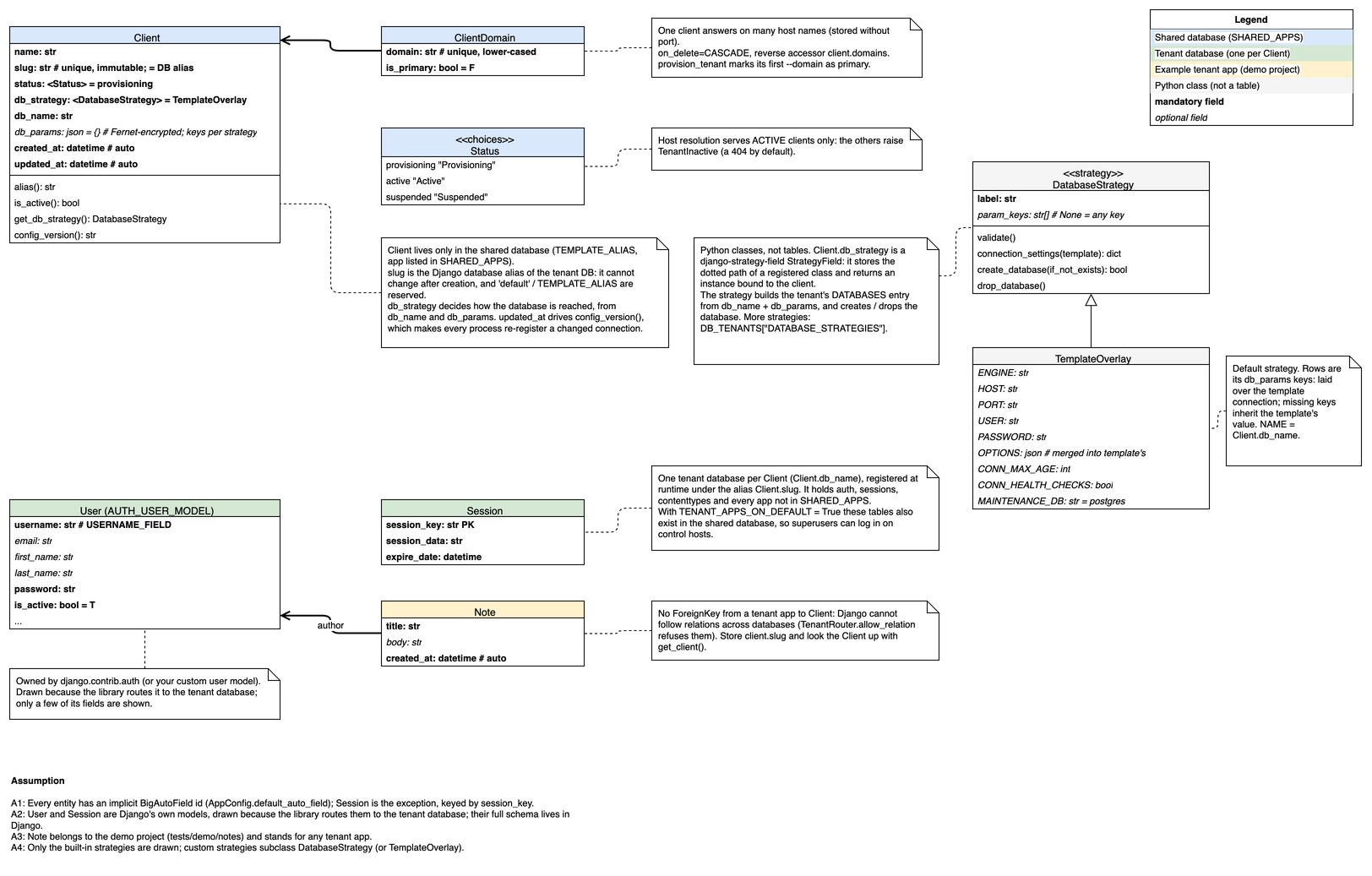
The diagram also shows the database strategy classes behind Client.db_strategy, Django's User and Session, because the library routes them to the tenant database, and the demo project's Note, as an example of a tenant-app table. Only the fields that matter to the library are drawn for them.
How to read it
- Every entity has an implicit
idprimary key, not drawn. A different primary key is drawn bold withPK(Session.session_key). - Bold rows are mandatory fields, italic rows optional ones (
blank=True).= valueis the default;T/Fstand forTrue/False. <Status>is a field typed by the<<choices>>box of the same name (Client.Status).- An arrow is a foreign key, pointing at the referenced entity; a 2 px line is a mandatory foreign key. The key column is named after the target (
ClientDomaintoClientisclient_id) unless the arrow has a label (author). - The bottom compartment of
Clientlists computed values (properties and methods). <<strategy>>boxes are Python classes, not tables: the database strategies a client can use throughdb_strategy.TemplateOverlayinherits fromDatabaseStrategy(hollow-triangle arrow); its rows are thedb_paramskeys it accepts.- Colours mark the database a table lives in; the legend in the top-right corner explains them.
Edit the diagram
data-model.drawio.png is an editable PNG: the image carries the draw.io source. To change it:
- Open
docs/development-guide/models/data-model.drawio.pngin draw.io (desktop app, web app or the IDE plugins). - Edit it, keeping the conventions above.
- Choose File > Export as > PNG, tick Include a copy of my diagram, and overwrite the same file.
*.drawio.png files are excluded from the check-added-large-files hook, so the diagram can grow past its 500 KB default.
Update the diagram in the same change as the model, and regenerate the migration (see Contribution guidelines).
Where tables live
| Table | Shared database | Tenant database |
|---|---|---|
django_db_tenants_client, django_db_tenants_clientdomain |
yes | never |
Tenant-app tables (auth_*, django_session, django_content_type, your apps) |
when TENANT_APPS_ON_DEFAULT = True (default) |
yes |
The router enforces this through allow_migrate, so migrate on the shared database and migrate_tenants on the tenants create exactly these tables.
Next steps
Read the field-by-field reference of Client.